
November 16, 2026
Project Status Update Template: Preserve Dates, Owners, and Unknowns
Use a repeatable project status update with five parts: the reporting period, current status and its basis, completed work, next actions with their owners and dates, and any risk, blocker, or decision needed. Write from verified notes, not memory. When a date, owner, status, or impact is unknown, label it as unknown or ask for clarification instead of letting an AI rewrite fill the gap.
The risk in a “polished” update is not only awkward wording. A rewrite can accidentally turn a target into a promise, an open question into a decision, or a shared task into one person’s commitment. The template below keeps the message readable while giving you a deliberate check for those facts.
A concise project status update template
Copy the fields that fit your team’s reporting style and leave out the rest:
[Project] — update for [reporting period], as of [date]

Status: [on track / at risk / blocked] against [milestone or plan], based on [verified reason or signal].
Completed: [specific work completed during this period].
Next: [owner] will [action] by [confirmed date].
Risk or blocker: [what is affected, what is known, and next action or owner].
Decision needed: [person] to choose [specific option] by [date] — or “No decision needed.”
Next update: [date, if agreed].
You do not need every line in every update. For a small weekly check-in, the status, one concrete change, and the next owner/date may be enough. For a milestone review, include material risks and decisions. If the update is only informational, say no action is needed only when that is true.
This structure is a practical short-message adaptation, not a universal project-management standard. For comparison, the New York State Project Management Guidebook’s status-report template separates the report date, schedule variance, issues and action items, action owner, due date, status, accomplishments, and planned activities. Use your organization’s required fields and definitions where they differ. See the NYS Project Management Guidebook templates.
Decide what status you can honestly report
Use the labels your team has agreed on. If your team has not defined them, explain the concrete condition instead of inventing a color or grade.
- On track: State which confirmed milestone or date remains achievable and what evidence supports that view. Do not infer “on track” merely because no one has reported a delay.
- At risk: Name the possible impact and the signal behind it. A risk is not the same as a confirmed delay; distinguish “could affect Friday’s review” from “Friday’s review has moved.”
- Blocked: Name the work that cannot proceed, the dependency or decision needed, and who owns the next action if that is known.
- Unknown: If the notes do not support a status, say that the status is not confirmed and identify what would confirm it. Do not force every update into green/amber/red language.
These are writing recommendations. Your project plan, workplace, or client agreement may define status terms differently. Prefer its definitions over this general template.
Example: turn rough notes into a useful update
The example details below are fictional. The output should not be sent as if it describes a real project.
Rough notes
Atlas checkout
period Nov 9–13
checkout QA passed on web
refund flow still has 2 open cases; QA has not retested
Mina to send test build by Nov 17 (confirmed in team notes)
vendor response maybe Tuesday? not confirmed
next review Nov 19 on plan
no decision request from team
Possible concise update
Atlas checkout — update for Nov 9–13, as of Nov 16

Status: The Nov 19 review remains on the current plan; refund-flow readiness is not yet confirmed.
Completed: Web checkout passed QA.
Next: Mina will send the test build by Nov 17, as recorded in the team notes.
Risk: Two refund-flow cases remain open and have not been retested. Vendor response timing is unconfirmed.
Decision needed: None identified in the notes.
Notice what the example does not do: it does not say the launch is “on track,” turn the possible vendor response into a Tuesday commitment, or claim the refund work is finished. It preserves the supplied information and makes the missing certainty visible. Before sending a real update, check the source plan or record for the project name, dates, owner, testing status, and any promised next step.
Use a reusable RewriteMate command for recurring updates
If you turn rough notes into a status message every week, a saved instruction can make the format repeatable. RewriteMate’s official documentation describes custom commands as user-written instructions saved as keyboard shortcuts. Review its Custom Command Recipes for how the feature works. A command can shape text you provide; it does not read your project tracker or verify whether a task is actually complete.
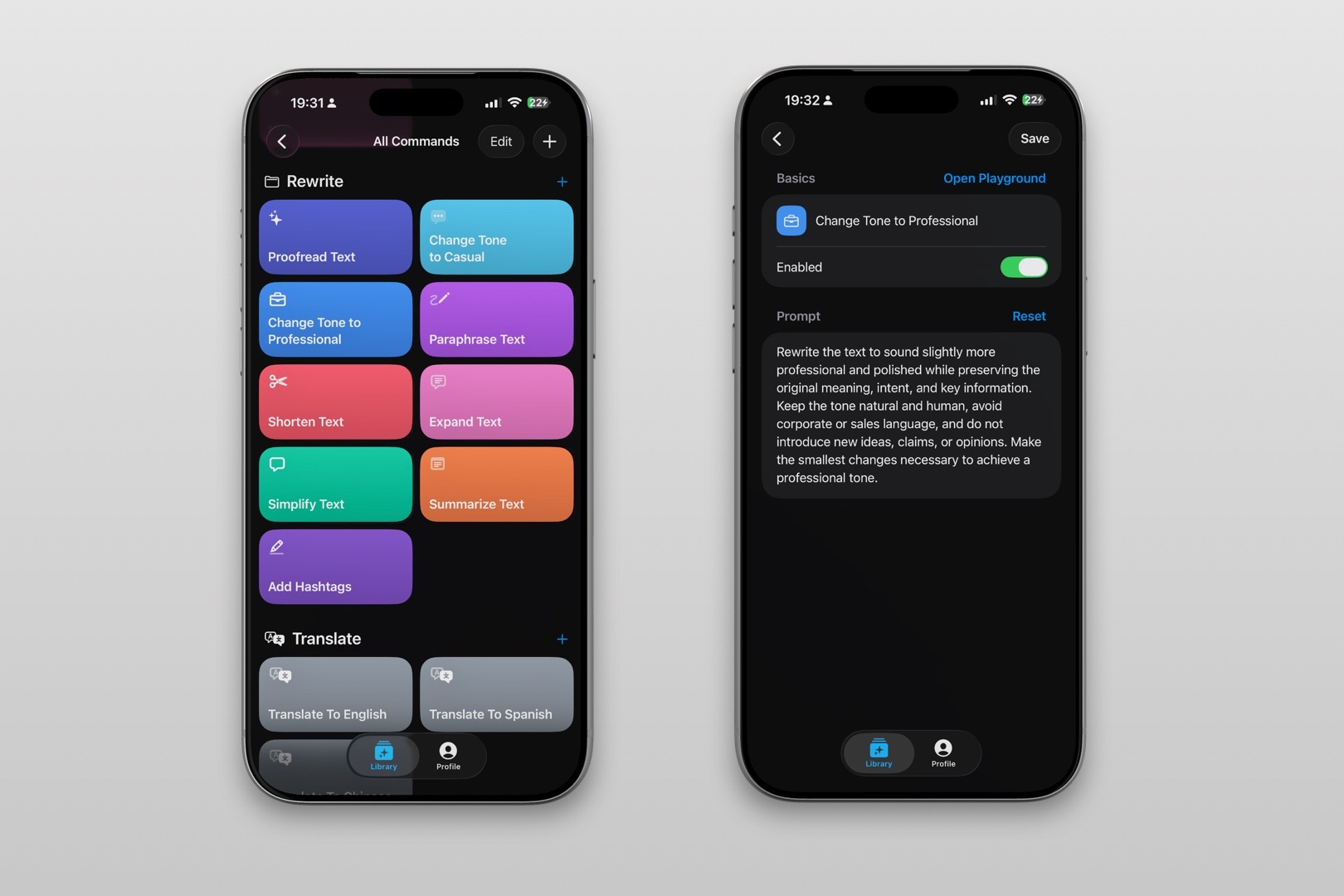
Command name: Project Status — Preserve Facts
Folder: Work or Project Updates
Suggested output action: Copy the result to review before sharing.
Instruction to save:
Turn the supplied project notes into a concise status update using these sections when the information is present: project and reporting period; current status and the supplied basis; completed work; next actions with the supplied owner and date; risks or blockers; decision needed; next update. Preserve every supplied name, date, number, milestone, owner, status, link, and commitment exactly. Do not infer that work is complete, a date is confirmed, a project is on track, or a risk has become a delay. Keep confirmed, proposed, and unknown information distinct. If notes conflict or a required fact is missing, ask a short clarification question instead of guessing. Do not add project-system data, policies, or promises that are not in the input.
Test a new command with non-confidential sample notes first. Adjust the sections to match your team’s actual status vocabulary and reporting cadence. A reusable prompt is a drafting aid, not a replacement for checking the current project record.
Before sharing: verify these facts yourself
Read the source notes alongside the proposed update. Check each item rather than asking whether the text “sounds right.”
- Reporting period and “as of” date: Do they match the period you intend to cover and the time the information was checked?
- Status and basis: Is the label supported by the agreed milestone, test result, or decision? Is a possibility clearly distinguished from a confirmed change?
- Owners: Did the source actually assign each next action to the named person? Do not turn “we should” into an assignment to one colleague.
- Dates and numbers: Confirm target dates, totals, percentages, estimates, and issue counts against the source. A deadline is not automatically a commitment.
- Risks and blockers: State what is known, what is still uncertain, and the next action. Do not add impact language unless the evidence supports it.
- Decisions and promises: Is a decision really needed? Was a review date or delivery promise agreed, or is it only proposed?
- Links and audience: Do links open the intended material, and is each recipient allowed to see the details included?
For confidential project details, customer data, unreleased plans, or internal identifiers, follow your organization’s approved-tool and information-handling rules. Do not paste sensitive notes into an AI tool unless that use is authorized. RewriteMate can help draft or transform text, but you remain responsible for verifying names, dates, numbers, status, policies, commitments, and sensitive content before sharing.
If the only issue is one blocked task, our project blocker update guide focuses on explaining the obstacle and asking for an unblock action. For a transfer of responsibility, see the project handoff message guide. If your source is rough meeting notes rather than project-status notes, use the separate meeting-notes-to-follow-up email workflow.
FAQs
What should a short project status update include?
At minimum, name the project and period, state the current position with a reason, say what changed, and identify the next action and owner/date when they are confirmed. Add a risk, blocker, or decision only when it affects the reader. Use your team’s required fields if it has a formal reporting format.
How often should I send a project update?
Follow the cadence agreed with your team or stakeholders. If no cadence exists, ask what interval is useful for the decisions they need to make. Do not present a weekly or daily schedule as universal; project pace and audience needs differ.
What if I do not know whether the project is on track?
Do not guess. Say which milestone or status is unconfirmed, state what information is missing, and identify who or what can confirm it if known. You can still report verified completed work separately from the overall status.
Should I include blockers in every status message?
Include material blockers or risks that affect work, timing, or a decision. If there are none in the information you checked, say so only if that statement is supported by the current source. Otherwise, distinguish “none reported” from “none exist.”
Can an AI command assign owners or dates from context?
It should not invent them. The command above tells RewriteMate to preserve supplied owners and dates and ask about missing or conflicting details. Review the output against the original notes; the tool cannot verify the underlying project record.
Can I use this for a client-facing update?
Adapt the detail and terms to your agreement and the client’s needs. Confirm dates, deliverable status, risks, decisions, and commitments against authorized records. Avoid sharing internal-only information or describing a target as a guarantee.
Related articles
Keep reading
How to Write a Project Blocker Update Without Blame
Tell your team what is blocked, what is still moving, and exactly what would unblock the work. Use neutral, fact-checked templates that separate confirmed impact from guesses.

How to Write a Project Handoff Message With a Clear Next Owner
A practical project handoff message should name the incoming owner, state what is verified, show the next action, flag open questions, and point to the source of truth. Use this concise template to transfer work without leaving the next person to reconstruct the context.
How to Turn Meeting Notes Into a Clear Follow-Up Email on iPhone
Turn rough iPhone meeting notes into a useful follow-up email without upgrading guesses into promises. Use a simple structure for decisions, owners, dates, open questions, and next steps—then verify the draft before sending.

Felix Tran
RewriteMate Dev & Editorial Lead
Write about everyday workflows, systems that help ideas move faster, from first draft to finished work.