
October 25, 2026
How to Write a Project Handoff Message With a Clear Next Owner
A useful project handoff message tells the next owner what they are taking over, what is known, what still needs attention, and where the working information lives. Name the incoming owner, summarize the verified current state, give the next action and any confirmed deadline, call out open questions, and link the source of truth. If responsibility has not actually been accepted or access has not been transferred, say so plainly; a message alone does not complete those steps.
A concise project handoff message template
Use this structure for an email, a team chat, or a note in the project space. Keep the summary short and link to fuller documentation instead of copying every detail into the message.
Subject: Handoff: [project or workstream] — [outgoing owner] to [incoming owner]
Hi [incoming owner],
I’m handing off [specific responsibility or workstream] to you, effective [confirmed date/time, if agreed].
Current state: [What is complete and what is in progress, based on the latest source.]
Next action: [One concrete action and the outcome needed. Include a deadline only if confirmed.]
Open items: [Unresolved question, dependency, risk, or “None currently known.”]
Working links: [Source-of-truth document, project record, or relevant thread.]
Please confirm that you can access the materials and that the ownership change is clear. [Name] remains the contact for [specific transition question] through [confirmed date, if applicable].
Thanks,
[Name]
This is a starting point, not a requirement to use every heading. For a tiny, low-risk task, a few sentences and one source link may be enough. For a project with several workstreams, dependencies, customer obligations, or formal controls, use the message to point to a fuller transition plan rather than compressing important details into a chat.
What the incoming owner needs to know
1. State exactly what is changing hands
“I’m handing over the project” can leave scope unclear. Identify the part that is changing owners: the launch checklist, weekly reporting, a client account, a particular approval, or a named workstream. If ownership is shared or temporary, describe the boundary: for example, “You’ll own the weekly status update; I’ll retain the budget approval until the review is complete.”
Do not imply that someone has accepted responsibility if you have only sent them a message. Use wording such as “I’m proposing that you take over…” when the transfer is not agreed, or “As agreed, you’ll own…” when it is. This small distinction prevents a proposed change from sounding like a completed decision.
2. Separate verified status from interpretation
Give the next owner a snapshot they can trust. Prefer concrete statements—“The draft is complete; legal review is still open”—over vague labels such as “nearly done.” Say where the status came from when it may have changed: “As of the project tracker updated Tuesday…”
Keep facts, risks, and guesses distinct:
- Verified: “The design review is complete; the approval record is linked below.”
- Open: “The release date has not been confirmed.”
- Possible risk: “If the vendor response slips, the planned review may need to move.”
The third line is a contingency, not a prediction. Labeling it that way helps the recipient avoid treating a possibility as a commitment. If a detail is unknown, write “not confirmed” or leave it as an explicit question rather than inventing a date, owner, or result.
3. Give one clear next action
“Please take it from here” transfers a burden without showing how to begin. Name the next action and its desired outcome: “Review the open comments and decide whether the draft is ready for approval.” If several actions are genuinely urgent, put them in a short ordered list and name an owner for each only when that ownership is agreed.
Add a due date only when it is real. If you are requesting a deadline, phrase it as a question—“Can you confirm whether Thursday is workable?”—rather than presenting Thursday as an established commitment. For work with a dependency, name the dependency and what should happen if it remains unresolved.
4. Point to one source of truth
Link the current project record, decision log, shared folder, or latest approved document. If there are several links, label each one so the recipient knows which is authoritative. Avoid sending an unlabeled bundle of attachments that may include old versions.
Project handover templates commonly include more than a summary: Smartsheet’s examples cover areas such as scope, schedule, risks, constraints, assumptions, roles, and tasks, which is a useful reminder to scale the supporting record to the work being transferred (Smartsheet’s project handover templates). The message can remain brief while the linked plan carries the fuller detail.
5. Make access and acceptance a separate check
Ask the incoming owner to confirm they can open the linked materials and understand what they own. Then follow the organization’s process for permissions, system access, approvals, or customer-contact changes. A handoff message does not itself grant access, change a project tool’s permissions, update an account owner, or transfer an approval authority.
Slack’s guidance on team alignment likewise emphasizes visible context and ownership as part of keeping handoffs moving (Slack’s team-alignment guide). Treat that as a communication principle, not a substitute for your team’s actual access-control or approval process.
Example: transferring a workstream without inventing commitments
The following is a fictional example. Its names, dates, and project are illustrative; replace them with details you have verified.
Subject: Handoff: Northstar onboarding checklist — Maya to Eli
Hi Eli,
As agreed, you’ll own the Northstar onboarding checklist beginning Monday. The first draft is complete, and the customer-success review is still open. The review date has not been confirmed.
Next action: Please check the three unresolved checklist comments and confirm whether they need customer input before the next review.
Open item: We’re waiting on the account team to confirm who will provide the final customer contact list. I haven’t received that confirmation yet.
Working record: [Northstar project record] and [latest checklist]. The project record is the source for status; the checklist is the working document.
Could you confirm that both links open for you and that the Monday ownership change matches your understanding? I can answer transition questions through Friday.
Thanks,
Maya
Notice what the note does not do: it does not imply the review date is booked, claim the contact list is ready, or say the work is complete. It names the next owner and immediate action while keeping unresolved details visible.
When a short message is not enough
Use a fuller handover plan when the work has multiple owners, active risks, external obligations, regulated or confidential information, or a long transition period. A plan may need separate sections for scope, schedule, open tasks, decisions, risks, dependencies, required training, and transition roles. Smartsheet’s handover-plan examples include project goals, risks, assumptions, transition roles, tasks, and training needs—details that usually do not fit in a brief message.
Also pause before sending if any of these are unclear:
- The incoming owner has not agreed to take the work.
- You cannot tell which document or status is current.
- A date, customer commitment, budget, or approval is uncertain.
- The work involves sensitive information that should not be copied into the message or an external writing tool.
- The transfer requires an access, authority, or account change that has not been completed.
Resolve the uncertainty with the appropriate person or process, or label it openly in the handoff. For confidential information, follow your organization’s policy and use approved systems; do not paste protected content into a writing assistant unless that use is permitted.
Make a rough handoff easier to scan
If you are starting from notes on your phone, first collect the facts and links in the approved project record. Then shape them into the template: responsibility, current state, next action, open items, and source links. Keep the message in your normal work channel and preserve any required approval process.
RewriteMate can help transform text you provide into a shorter, more organized draft. It does not verify the project record or independently know whether a person, date, status, or commitment is correct. Review every name, owner, deadline, link, risk, and promise before sending. For sensitive project details, use only text and tools allowed by your organization.
If you regularly write this kind of handoff, RewriteMate’s custom-command guide explains how saved instructions can be used as one-tap writing shortcuts. A useful instruction would ask for the five handoff fields above and tell the tool to preserve uncertainty rather than fill gaps. That is a drafting aid—not an automatic project transfer.
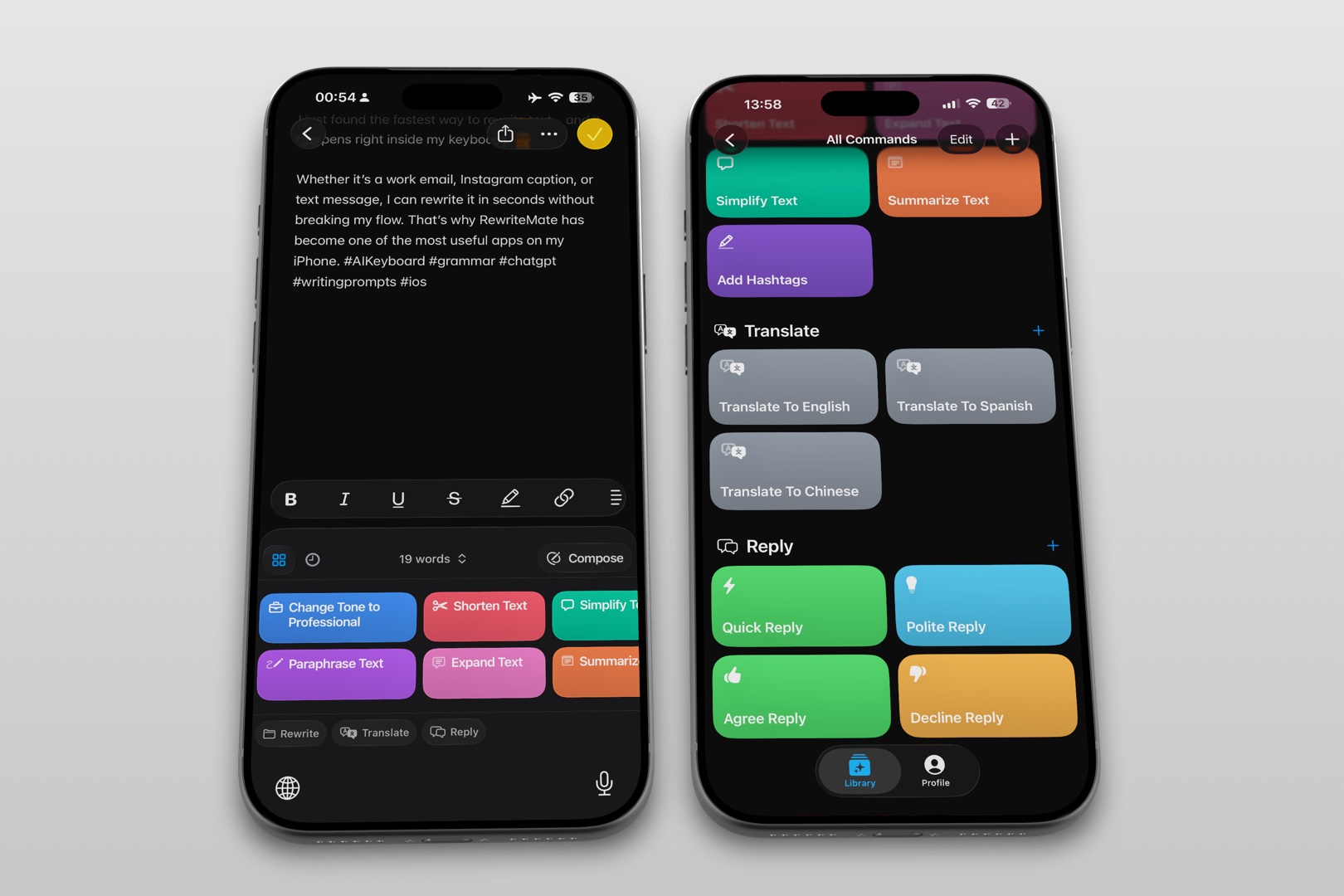
For example, an instruction could say: “Organize these notes into responsibility, verified status, next action, open items, and source links. Keep unknowns marked as unconfirmed. Do not invent owners, dates, decisions, or commitments.” Compare the resulting draft with the source record before using it.
For a related situation, see how to write a project blocker update without blame when the main task is asking for an unblock action rather than transferring ownership. If the handoff is going by email, how to reply to an email professionally from your iPhone covers the separate challenge of shaping a professional email reply.
FAQs
What should a project handoff message include?
Name the responsibility and incoming owner, state the verified current status, give the next action, flag open questions or dependencies, and link the current source of truth. Add a deadline only if it has been confirmed.
How long should a project handoff email be?
Keep the message as short as the work allows. A low-risk task may need only a few sentences and a link; a multi-workstream or high-consequence transfer needs a fuller plan. The message should orient the recipient, not replace the complete project record.
How do I hand off work when the new owner has not confirmed?
Do not write as though the transfer is complete. Say that you are proposing the change, identify what still needs agreement, and ask for confirmation. Keep the current owner and any transition date explicit until the responsibility change is settled.
Should I include unfinished tasks?
Yes. List important open tasks, their verified status, the next action, and the responsible person only when known. Mark missing owners or dates as unconfirmed instead of guessing.
Does a handoff message transfer file or system access?
No. A message communicates context and intent; it does not itself change permissions, account ownership, approval authority, or system access. Follow the relevant team or organization process and verify access separately.
Can AI write a project handoff message?
An AI writing tool can help organize supplied notes into a draft, but it cannot be assumed to verify the live project status or commitments. Check every factual detail against the source of truth and avoid entering sensitive material unless your organization permits it.
Related articles
Keep reading
How to Write a Project Blocker Update Without Blame
Tell your team what is blocked, what is still moving, and exactly what would unblock the work. Use neutral, fact-checked templates that separate confirmed impact from guesses.

How to Reply to an Email Professionally From Your iPhone
Write clear, professional email replies from your iPhone with a simple structure, practical examples, and AI-assisted editing tips that keep your message accurate.

Felix Tran
RewriteMate Dev & Editorial Lead
Write about everyday workflows, systems that help ideas move faster, from first draft to finished work.