October 19, 2026
How to Write a Project Blocker Update Without Blame
When a project is blocked, send a short update that names the work stopped, the missing input or decision, the impact you can verify, and one clear action that would unblock it. Keep the wording about the work—not the person—and say what can continue in parallel. If you do not know the schedule impact or the right owner yet, mark it as unknown instead of guessing.
A blocker update is not a blame note or a full project report. It is a small, actionable status message that helps the team understand what changed and what response is needed. Slack’s status-report guidance separates current blockers from potential risks and recommends including tasks, decisions, and schedule or milestone information when relevant (Slack’s status report guide). The exact format should still fit your team’s process.
First distinguish a blocker from a risk
A blocker is an issue currently preventing a specific piece of work from moving. A risk is a possible future problem that could affect work but has not stopped it yet. Slack makes a similar distinction in its project-report guidance: blockers hinder progress, while risks may occur in the future. Atlassian’s project status report guidance likewise describes blockers as issues holding up progress and recommends making the next steps clear.
That difference changes the language:
| Situation | Accurate wording | Avoid saying |
|---|---|---|
| A required input is missing and the next task cannot proceed | “The launch checklist is blocked until we receive the approved pricing.” | “The launch is doomed.” |
| A date may slip, but work can continue | “The review may affect Friday’s handoff; the impact is not confirmed yet.” | “We are blocked” if no work has stopped |
| The work is waiting on an unassigned decision | “The decision owner is not confirmed. Who should approve the final copy?” | Naming a person as responsible without confirmation |
| A dependency is late but other tasks remain possible | “The integration test is waiting on the staging credentials; documentation can continue.” | “Nothing can move” when parallel work is available |
Do not label a project or a person “blocked” without specifying the affected task. A precise update gives the reader something they can act on.
Use a five-part blocker update
For a concise message, put the information in this order:
- Work affected: name the deliverable, decision, or next task that cannot proceed.
- Current blocker: state the missing input, access, decision, or dependency.
- Known impact: include only a schedule or scope effect you have checked. If none is confirmed, say so.
- Unblock request: ask for one action, decision, or owner.
- Work continuing or next check: mention useful parallel work or when you will update again, if that time is agreed.
The format follows the practical elements common to project status reports—status, blockers, tasks or decisions, schedule, and next steps—without turning a chat-sized update into a full report. Use only the parts that help the recipient decide what to do next.
Copy-and-adapt template
Blocked: [specific task or deliverable] is waiting on [missing input or decision]. Impact: [verified effect], or “schedule impact not confirmed yet.” Unblock request: [person/role, if confirmed], could you [one specific action] by [date, if agreed]? Meanwhile, [parallel work] can continue. I’ll update the status [at the agreed checkpoint / when the dependency changes].
The bracketed fields are prompts, not facts. Remove any field that does not apply. Do not fill in a date merely to make the message look complete.
Examples for common blocker situations
The examples below are fictional wording patterns. Replace every project detail with information you have verified.
Waiting for a decision
The onboarding copy is blocked at final approval. The draft is ready, but the sign-off choice between version A and B is still open. Could the product owner confirm which version to use? I can continue checking the help-center links while we wait. I don’t have a confirmed launch-date impact yet.
This tells the team what is stopped and what is not. It does not imply that approval has been refused or that the launch will move.
Waiting for a dependency from another team
The data-import test is waiting on a sample export from the analytics team. The test cannot start without that file; the test plan and edge-case list are ready. Could the team confirm who can provide the sample and the expected handoff time? I’ll update the test schedule after we have that information.
If you know the owner and time, use them. If you do not, ask for ownership instead of assigning blame or inventing a deadline.
The impact is uncertain
The report is blocked while we confirm which source file is final. I haven’t established whether this affects Thursday’s review. Could someone confirm the approved file or point me to its location? I’ll keep formatting the sections that do not depend on the figures.
“Impact not confirmed” is useful information. A forecast should be labeled as a forecast, and a verified schedule change should be described as a fact only after it has been confirmed.
Keep the wording direct without assigning fault
Describe the dependency, not a person’s character or motive. Compare these pairs:
- “Waiting on Jordan again” → “The draft is waiting for the confirmed legal review.”
- “Design is holding us up” → “The final export depends on the approved banner dimensions.”
- “No one has made a decision” → “The decision owner is not recorded; who should confirm option A or B?”
- “This will make us late” → “If the approval arrives after [verified cutoff], [specific milestone] may move; the owner is confirming the schedule.”
Neutral language is not a reason to hide urgency. If a real deadline is near, state the date, why it matters, and the action needed. Avoid sarcasm, “again,” “still hasn’t,” and guesses about why something is delayed. The point is to make the next step unmistakable while keeping responsibility factual.
Common mistakes that make an update less useful
- Only saying “blocked.” Add the affected work and missing input so people can locate the problem.
- Mixing a risk with a confirmed delay. Label what has happened separately from what might happen.
- Listing several unrelated asks. Put the highest-priority unblock request first; add separate requests only when they are truly needed.
- Naming an owner you have not confirmed. Ask who owns the decision or use the role/team if that is all you know.
- Making up a date to create urgency. Use an agreed date or explain that timing is still being checked.
- Reporting no progress when some work can continue. Say what remains possible, but do not pretend parallel work resolves the blocker.
- Sending a long backstory before the ask. Put the blocked task and requested action at the top; add context only if it changes the decision.
Draft the message from your iPhone
You do not need a special Slack or project-management feature to write a clear blocker note. Draft the text in the communication channel your team already uses, check the source task or project record for names and dates, and make the unblock request easy to spot. This article is about the message itself, not how to navigate a particular app; screenshots of Slack or another service would not clarify the wording steps.
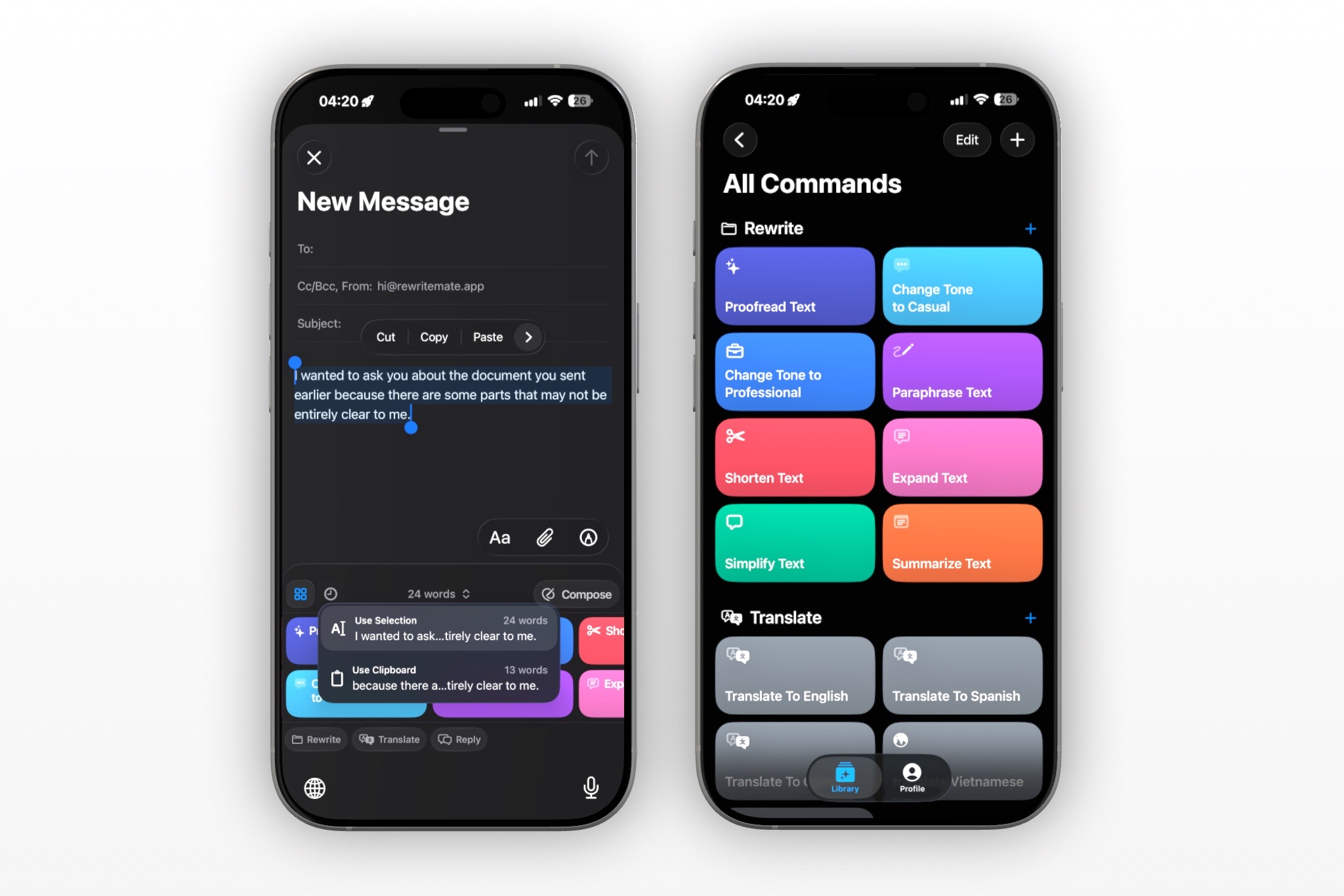
If you repeat this task, you can use a saved RewriteMate custom command to organize rough notes into a short update. RewriteMate’s Custom Command Recipes describes custom commands as saved writing instructions that appear as keyboard shortcuts, and includes a raw-notes-to-bullets recipe. It does not connect to Slack, check project records, confirm owners, or verify dates; you provide the text and review the result.
One possible instruction to adapt is:
Turn my supplied notes into a concise, neutral project blocker update. Preserve all names, tasks, dates, numbers, decisions, and commitments exactly as written. Separate confirmed facts from risks or unknowns. State what work is blocked, the missing input or decision, any verified impact, one clear unblock request, and work that can continue in parallel. Do not assign blame, invent an owner or deadline, or claim the project is delayed unless my notes confirm it. Mark missing details as [CONFIRM: detail].
Try it on a low-stakes draft first. Compare the result with your notes and source record, then use Copy if you want to review it beside the original before sending. Check the project name, task, owner, dates, impact, and requested action yourself.
Before you send
- Is the affected work named specifically?
- Is the blocker active, or is this only a risk?
- Are the owner, decision, date, and impact confirmed?
- Can the recipient tell exactly what response would unblock the work?
- Have you said what can continue, if anything?
- Is the next checkpoint real and agreed—not a guessed promise?
If the message affects a customer commitment, launch date, safety decision, or contractual obligation, check the authoritative project record and follow your team’s escalation process. A rewrite can improve clarity, but it cannot establish the facts or decide priority for you.
FAQs
What should a project blocker update include?
Name the specific work that is stopped, the missing input or decision, the impact you can verify, and one action that would unblock it. Add parallel work or a next checkpoint when useful. Leave unknown dates, owners, and impacts visibly unconfirmed.
How do I report a blocker without blaming a teammate?
Describe the work dependency instead of judging the person. For example, say “the handoff is waiting for the approved file” rather than “Sam is holding up the project.” Name an owner only when that responsibility is confirmed.
Should I say a project is blocked if the date might slip?
Not necessarily. If work is still moving and only a future delay is possible, describe it as a risk or possible impact. Reserve “blocked” for a specific task that cannot currently proceed.
What if I don’t know the schedule impact yet?
Say that the impact is not confirmed, then state what information is needed to assess it and when you expect to check again—only if you can commit to that checkpoint. Do not turn uncertainty into a definite delay.
Can AI write a project blocker update?
An AI writing tool can help structure notes you provide, but it may not know the current project record or team ownership. Review the output against the source of truth, especially task status, names, dates, decisions, and impact, before sharing it.
Make the next move visible
A strong blocker update is calm, specific, and easy to act on: name what stopped, explain what is missing, state only verified impact, and ask for the next decision or input. If the facts are incomplete, make that uncertainty clear. RewriteMate can help shape a supplied draft into that structure, while you remain responsible for validating the project details and choosing where to send it.
Related articles
Keep reading
How to Ask for an Update Without Sounding Passive-Aggressive
Ask for the work update you need without blame, vague nudges, or fake urgency. Use these concise message examples for teammates, managers, and clients, plus a reusable iPhone drafting command.
How to Disagree Professionally in a Slack Message (Without Sounding Dismissive)
Disagree with a coworker in Slack without turning a useful difference of opinion into a personal conflict. Use a clear message structure, practical examples, and a quick review checklist before you send.
How to Turn Meeting Notes Into a Clear Follow-Up Email on iPhone
Turn rough iPhone meeting notes into a useful follow-up email without upgrading guesses into promises. Use a simple structure for decisions, owners, dates, open questions, and next steps—then verify the draft before sending.

Felix Tran
RewriteMate Dev & Editorial Lead
Write about everyday workflows, systems that help ideas move faster, from first draft to finished work.