August 18, 2026
QuillBot vs RewriteMate for iPhone: Which AI Keyboard Fits Your Writing?
QuillBot and RewriteMate both bring AI writing help to iPhone, but they suit different workflows. Choose QuillBot if you want a broad writing toolkit with paraphrasing modes, grammar checking, translation, AI detection, and an editor. Choose RewriteMate if you want fast, reusable writing transformations—such as changing tone, shortening text, or applying your own saved instructions—directly where you type.
Both tools can help you improve writing without moving every draft to a laptop. The better choice depends on whether you want a wide set of writing tools or a keyboard-first workflow built around quick edits in messages, email, notes, and social apps.
The quick answer
| Choose QuillBot if you want… | Choose RewriteMate if you want… |
|---|---|
| Multiple paraphrasing modes | One-tap rewriting commands |
| Grammar checking and translation | Tone changes inside your current app |
| AI detection and a larger mobile writing toolkit | Custom instructions you can reuse |
| A dedicated editor for longer writing | Faster editing for messages, emails, and notes |
| A familiar paraphrasing-focused workflow | A keyboard-native workflow with fewer steps |
Neither app is automatically “better.” Both can be useful, and both require you to review the final text before sending it.
What QuillBot offers on iPhone
QuillBot began as a paraphrasing tool, and that history shows in its mobile experience. Its iOS keyboard is designed to provide writing assistance wherever you type.
According to QuillBot’s iOS keyboard help guide, the keyboard gives access to its Paraphraser, Grammar Checker, Translator, and other tools inside apps on iPhone and iPad.
QuillBot’s App Store listing also describes features such as:
- Paraphrasing modes
- Grammar checking
- Translation
- AI detection
- AI-generated writing support
- A mobile editor for creating and saving documents
- Sentence and text rewriting in the keyboard
QuillBot’s current App Store listing is the best place to confirm its latest available modes, limits, and subscription features before you install it.
Who QuillBot is best for
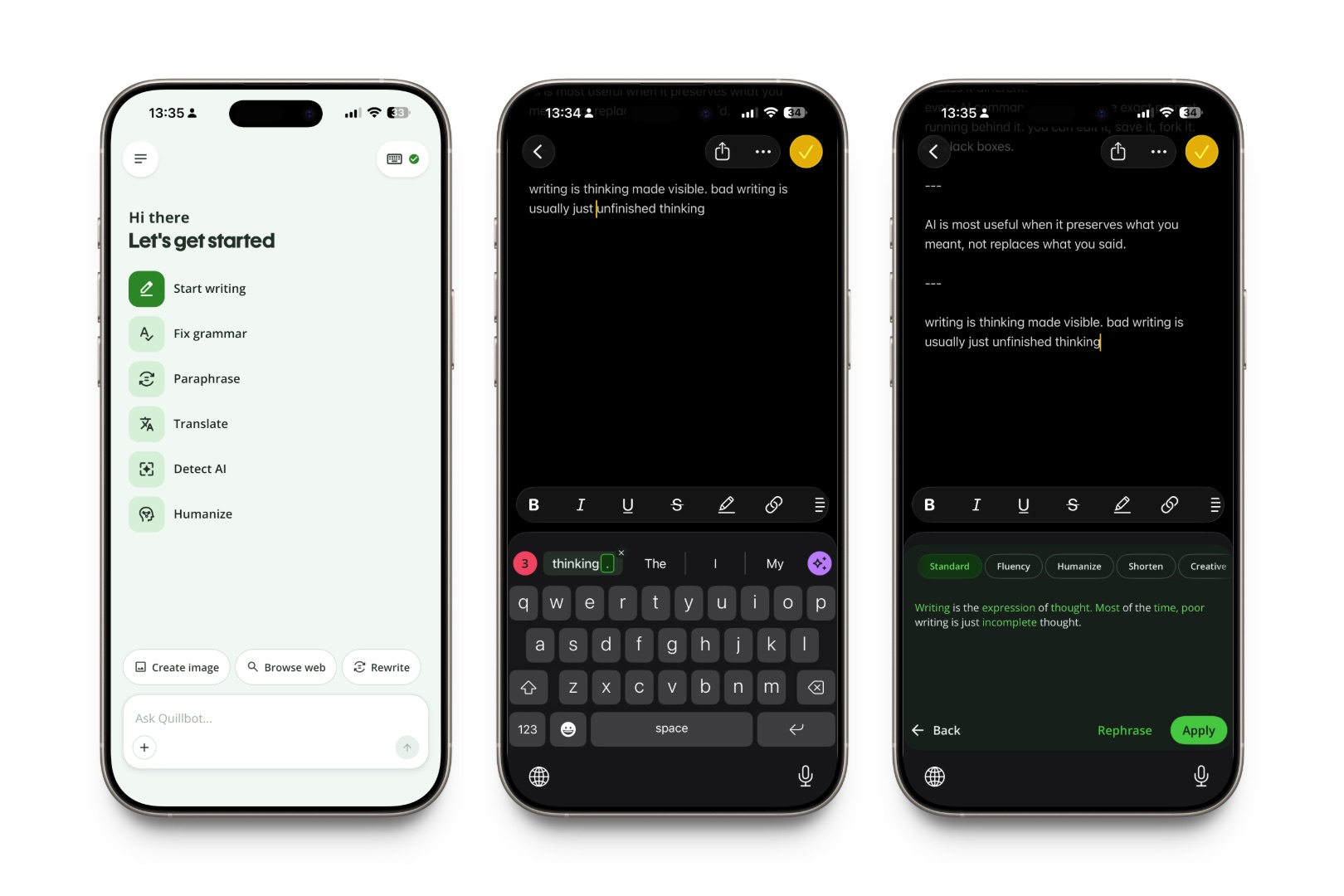
QuillBot can be a strong fit if you:
- Regularly paraphrase school, work, or long-form writing
- Want multiple rewriting modes to compare
- Need grammar and translation in the same tool
- Prefer having a separate mobile editor for drafts
- Want AI detection alongside writing tools
- Already use QuillBot on the web or desktop
It is especially useful for people whose workflow starts with a document and ends with a polished version of that document.
What RewriteMate offers on iPhone
RewriteMate is designed around editing text in the apps where you already write. It works as an AI keyboard extension, so the core workflow is simple: select or draft text, run a command, review the result, and continue writing.
RewriteMate’s iOS page describes tools for:
- Proofreading
- Changing tone
- Paraphrasing
- Shortening text
- Expanding text
- Simplifying language
- Summarizing key points
- Creating custom prompts and instructions
RewriteMate’s iOS keyboard overview also emphasizes that the keyboard can work in messages, emails, notes, and social apps.
The biggest difference is workflow. Instead of offering a large set of paraphrasing modes as the center of the experience, RewriteMate focuses on reusable text transformations that you can use while you are already typing.
Who RewriteMate is best for
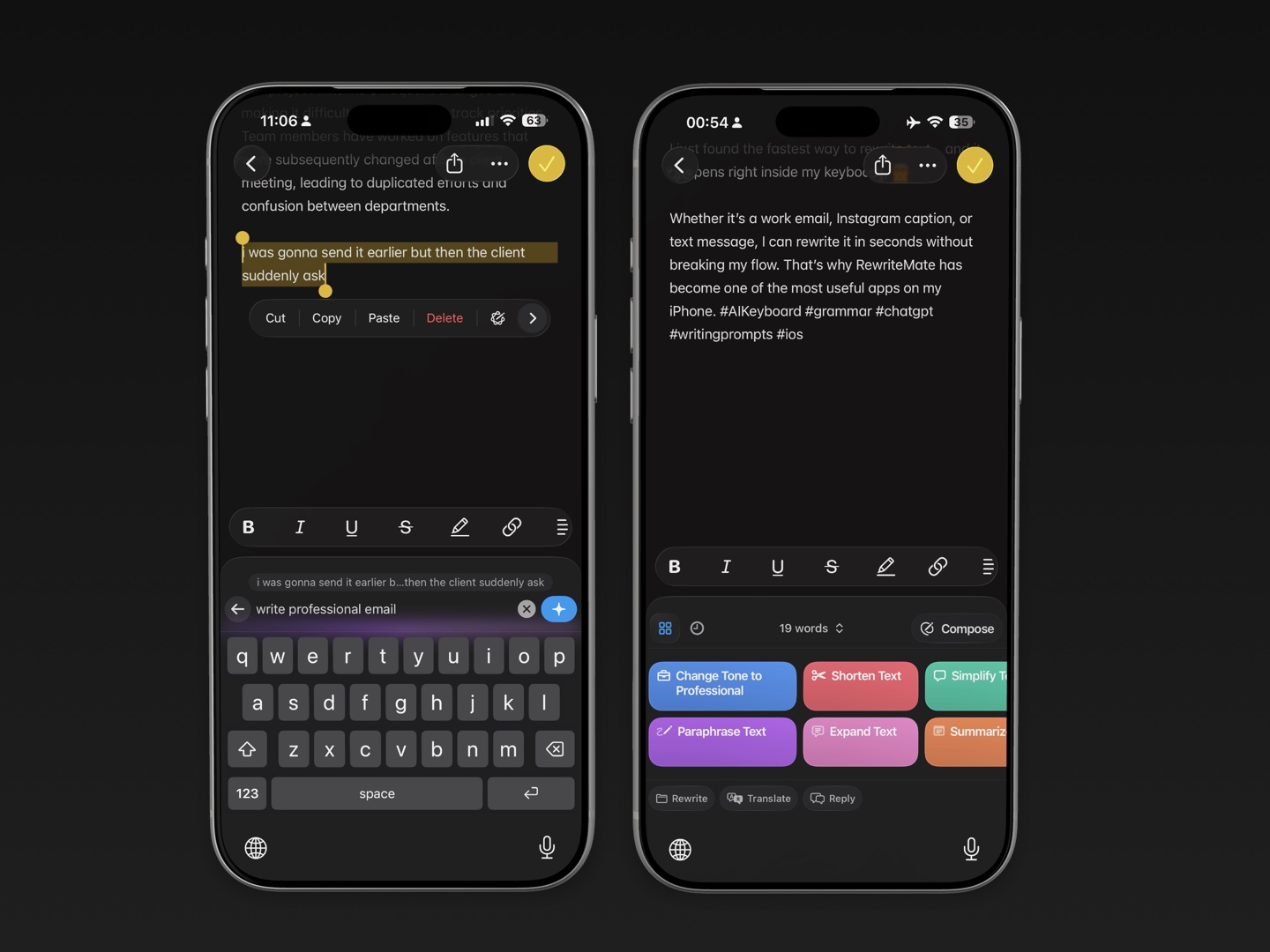
RewriteMate can be a better fit if you:
- Write many messages, emails, comments, and short notes on iPhone
- Want to change tone quickly without opening another app
- Need the same rewrite instruction repeatedly
- Prefer creating custom commands for your own workflows
- Want a simpler path from draft to edit to send
- Care more about practical writing tasks than AI detection or a document editor
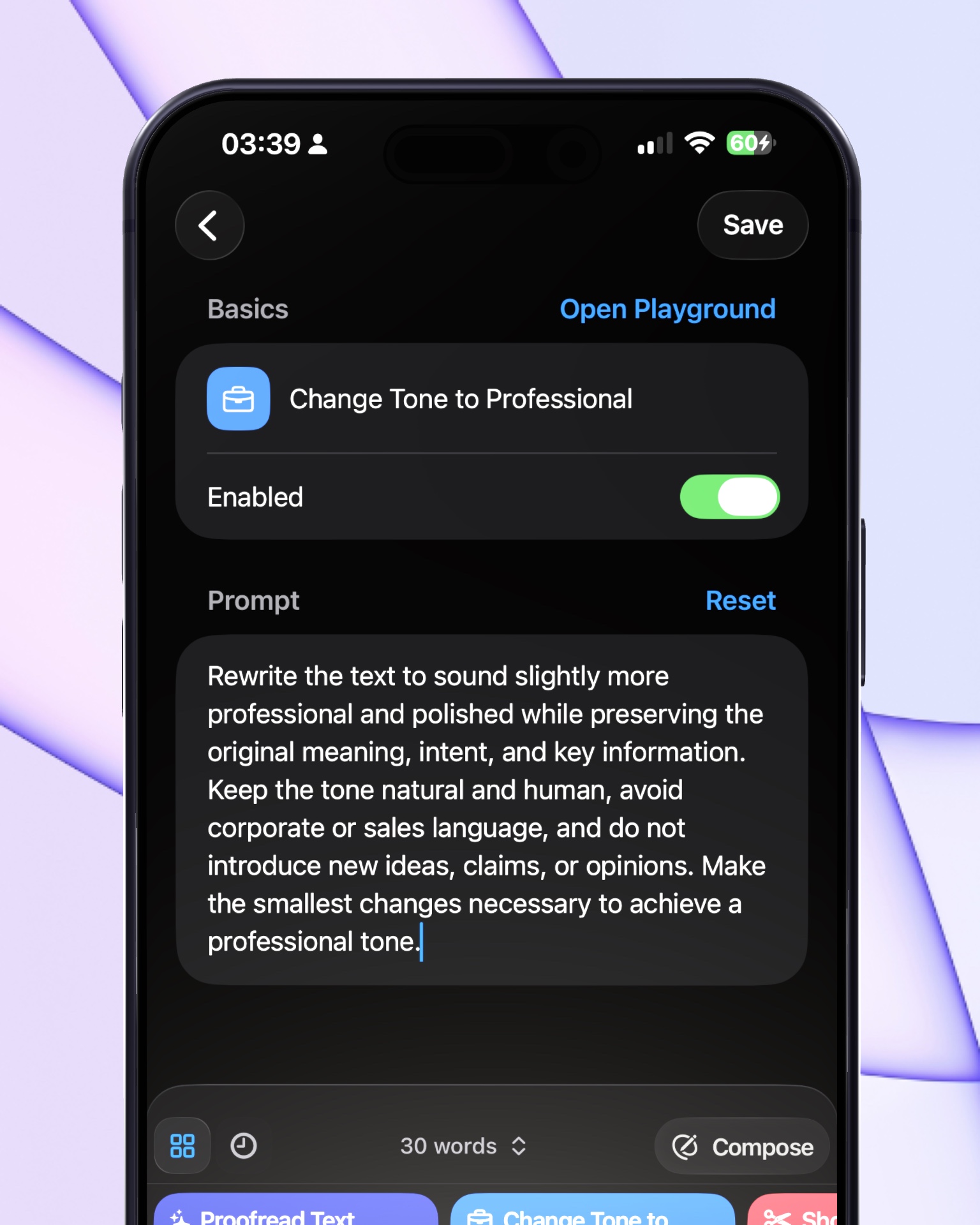
For example, if you regularly write client emails, you could save a custom command such as:
Fix grammar, remove filler, keep the tone warm, and make this under 60 words.
That is different from choosing a paraphrasing mode every time. It lets you build a repeatable writing habit around the kind of communication you do most often.
Paraphrasing: which app is better?
QuillBot is the more obvious choice if paraphrasing itself is your main goal. Its product is built around giving users multiple ways to rephrase text, which can be useful when you want to compare style, structure, vocabulary, or level of formality.
RewriteMate is better suited to people who see paraphrasing as one part of a broader mobile writing workflow. You may not need several paraphrase modes if your actual goal is:
- Make this shorter
- Make this clearer
- Make this friendlier
- Make this more professional
- Keep my meaning but fix the grammar
- Turn this note into a reply
The right question is not “Which app paraphrases better?” It is “What do I need the rewrite to accomplish?”
Grammar checking and clarity
Both QuillBot and RewriteMate can help you refine grammar and clarity on iPhone.
QuillBot’s grammar checker is part of its broader writing suite. If you want grammar review, paraphrasing, translation, and an editor in one product, that can be convenient.
RewriteMate is practical for grammar checks when you are writing in a real conversation or document. You can draft a sentence in Mail, Messages, Slack, or Notes, then run a proofreading or clarity-focused command without moving the text elsewhere.
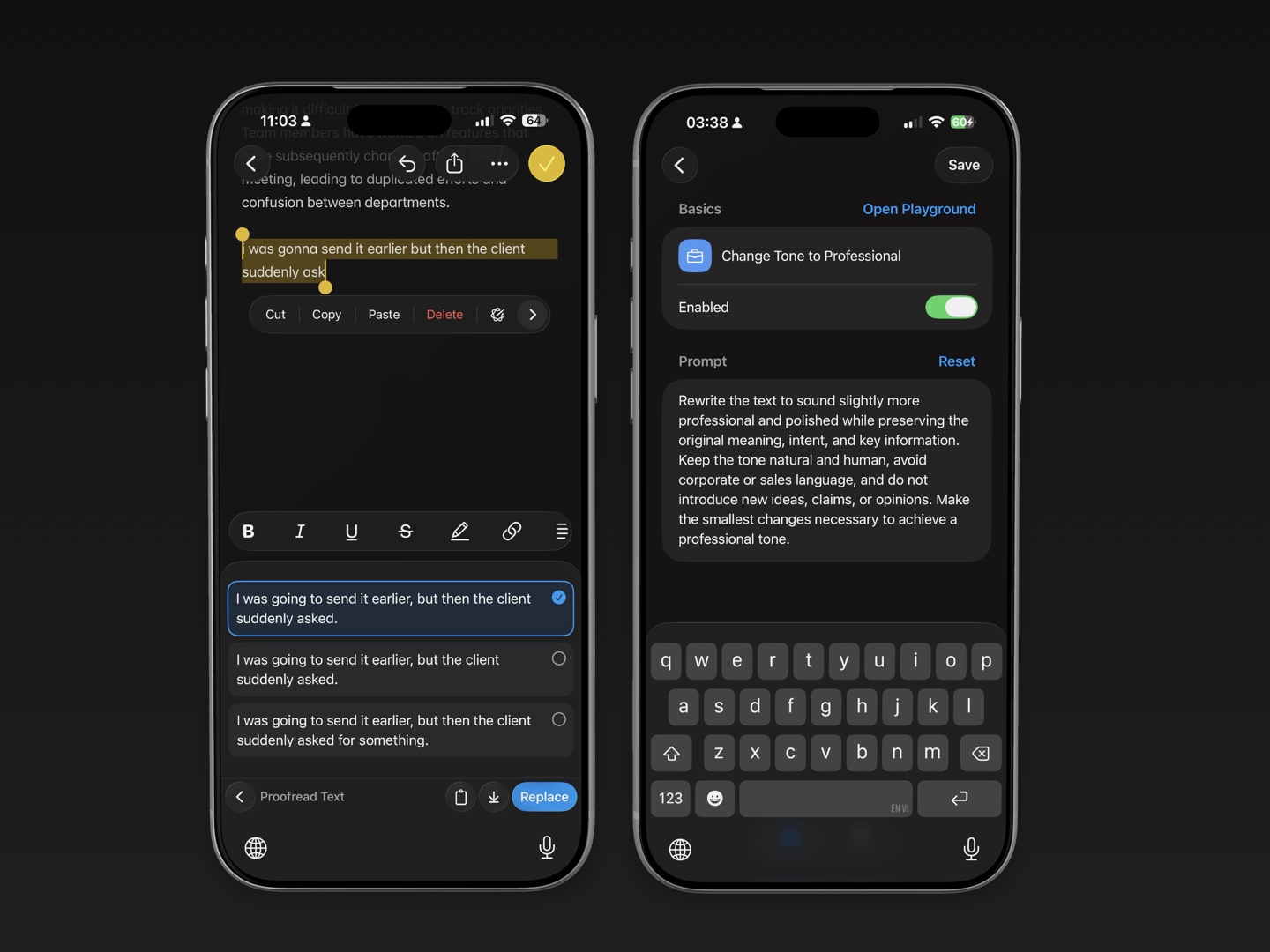
For either app, grammar suggestions should be treated as suggestions—not final decisions. Pay close attention to:
- Names
- Dates
- Numbers
- Technical terms
- Product names
- Legal or financial language
- Sentences where tone matters
AI can improve wording, but it cannot know your full context.
Tone changes: where RewriteMate has an advantage
Tone is often the difference between a message that is technically correct and one that works.
Consider this draft:
I need this today because it is already late.
It may be accurate, but it can sound abrupt. A tone adjustment could turn it into:
Could you please send this today? We are already behind schedule, and it would help us keep the project moving.
Or, for a close coworker:
Quick reminder—could you send this over today? It would really help us keep things on track.
RewriteMate is especially useful when these tone changes are part of your daily writing. Its built-in commands and custom instructions let you decide how messages should sound before you run the rewrite.
QuillBot can also help refine wording and style, but RewriteMate’s keyboard-first command approach is a better fit if you often make the same kinds of edits across many apps.
Translation and multilingual writing
QuillBot lists translation as a core mobile tool, and its App Store listing describes support for multiple languages. If translation is a major reason you need an AI keyboard, review the latest language list and limitations in the App Store before making a choice.
RewriteMate also offers translation as part of its iOS keyboard workflow. It can be useful when you want to translate a message, then immediately refine the result for tone or clarity.
For either tool, follow this workflow:
- Translate the main idea.
- Check names, dates, places, and numbers.
- Review the tone for the recipient.
- Make sure the final wording says what you intended.
Translation can give you a useful draft. It should not replace your judgment in high-stakes communication.
Custom workflows and reusable commands
This is one of the clearest differences between the two products.
RewriteMate lets users create saved custom commands. Its custom command guide explains that users can save their own AI instructions as one-tap keyboard shortcuts.
That is helpful when you repeat the same writing task often.
Examples:
For work email
Make this concise, professional, and warm. Keep all deadlines and names unchanged.
For Slack
Rewrite this as a clear, confident Slack update. Use short sentences and remove filler.
For social posts
Keep the meaning, make this more conversational, and avoid corporate language.
For non-native English writing
Correct grammar and make this sound natural, but keep my simple writing style.
QuillBot offers a more feature-rich suite for paraphrasing and document-oriented writing. RewriteMate is more appealing when you want to turn your own instructions into a permanent part of your keyboard workflow.
Privacy and Full Access
Any third-party keyboard deserves a careful privacy review, especially if it uses online AI features.
On iPhone, a custom keyboard may ask for Allow Full Access to use network-connected services. Apple says that without open access, a custom keyboard has no network access. With open access enabled, the keyboard can use network resources and perform functions requiring server support.
Apple’s custom keyboard documentation explains that keyboards handle sensitive user data and that open access should be enabled thoughtfully.
Before turning on Full Access for QuillBot, RewriteMate, or any other keyboard:
- Read the current privacy policy.
- Check what text is processed.
- Look for retention and deletion information.
- Avoid submitting passwords, financial data, or confidential work information.
- Confirm whether your workplace permits the tool.
- Turn off the permission later if you no longer need the connected features.
Do not assume two AI keyboards handle data in the same way just because they offer similar writing features.
A simple test before you choose
The easiest way to choose between QuillBot and RewriteMate is to test the workflow you actually use.
Try rewriting these three items:
- A short work email
- A casual text message
- A paragraph from a note or document
Then ask:
- How many steps did it take?
- Did the rewrite preserve my meaning?
- Was the suggested tone useful?
- Could I find the feature quickly?
- Would I use this tool every day?
- Does the privacy model fit the kind of text I write?
- Do I need a document editor, or do I mainly edit text in other apps?
The right keyboard should reduce friction. If it makes you copy, paste, and second-guess every message, it is probably not the best fit for your workflow.
Write better everywhere
Rewrite, rephrase, and refine text instantly without switching apps.
FAQs
Is QuillBot available as an iPhone keyboard?
Yes. QuillBot provides an iOS writing keyboard with tools including paraphrasing, grammar checking, translation, and other AI writing features. Check QuillBot’s official help center or App Store listing for the latest setup details.
Is RewriteMate better than QuillBot?
Neither is universally better. QuillBot is a strong option for paraphrasing-focused writing, multiple modes, and a broader writing toolkit. RewriteMate is a strong option for quick in-app edits, tone changes, and reusable custom commands.
Can I use QuillBot and RewriteMate in Messages or Mail?
Both products are designed to provide writing support on iPhone. Add the keyboard in iPhone Settings, then use the globe key to switch keyboards while typing.
Which is better for paraphrasing on iPhone?
QuillBot may be a better fit if you want paraphrasing modes as the central feature. RewriteMate may be a better fit if you want paraphrasing alongside quick tone, clarity, shortening, and custom-command workflows.
Which is better for professional emails?
Try RewriteMate if you frequently need to make mobile emails more concise, professional, or warm using a repeatable command. Try QuillBot if you want a broader set of writing and paraphrasing tools in addition to email editing.
Do QuillBot and RewriteMate need Full Access?
Third-party AI keyboards may need Full Access for connected features. Read each provider’s current permission explanation and privacy policy before enabling it.
Can AI keyboards replace proofreading?
No. AI keyboards can help you spot grammar, clarity, and tone issues, but you should always review the final version before sending an important message.
Choose the keyboard that matches how you write
QuillBot is a compelling choice for people who want a broad paraphrasing and writing toolkit on iPhone. RewriteMate is a compelling choice for people who want practical, repeatable edits directly in the apps where they already communicate.
If your day involves many messages, emails, and short drafts, try RewriteMate and build a few custom commands around the edits you make most often. If paraphrasing modes, translation, AI detection, and a dedicated editor are your priorities, QuillBot may be the better fit.
Related articles
Keep reading

RewriteMate vs Grammarly Keyboard: Which Is Better for Mobile Writing?
Compare RewriteMate vs Grammarly Keyboard to see which iPhone writing assistant fits your workflow. Learn the differences in AI rewriting, grammar checking, customization, pricing, and everyday mobile writing.
Grammarly Alternative iPhone: RewriteMate vs Grammarly
A head-to-head comparison of the best AI writing keyboards for iOS, highlighting why custom prompts beat locked presets.

Gboard vs RewriteMate for iPhone: Which Keyboard Should You Use?
Compare Gboard and RewriteMate on iPhone for multilingual typing, glide typing, search, grammar, rewrites, tone changes, and AI writing workflows.

Felix Tran
RewriteMate Dev & Editorial Lead
Write about everyday workflows, systems that help ideas move faster, from first draft to finished work.